
What you can do in Live Visibility
CargoGen follows the vessels on your active jobs using live AIS data. The list of vessels updates every five minutes as jobs are added or completed.
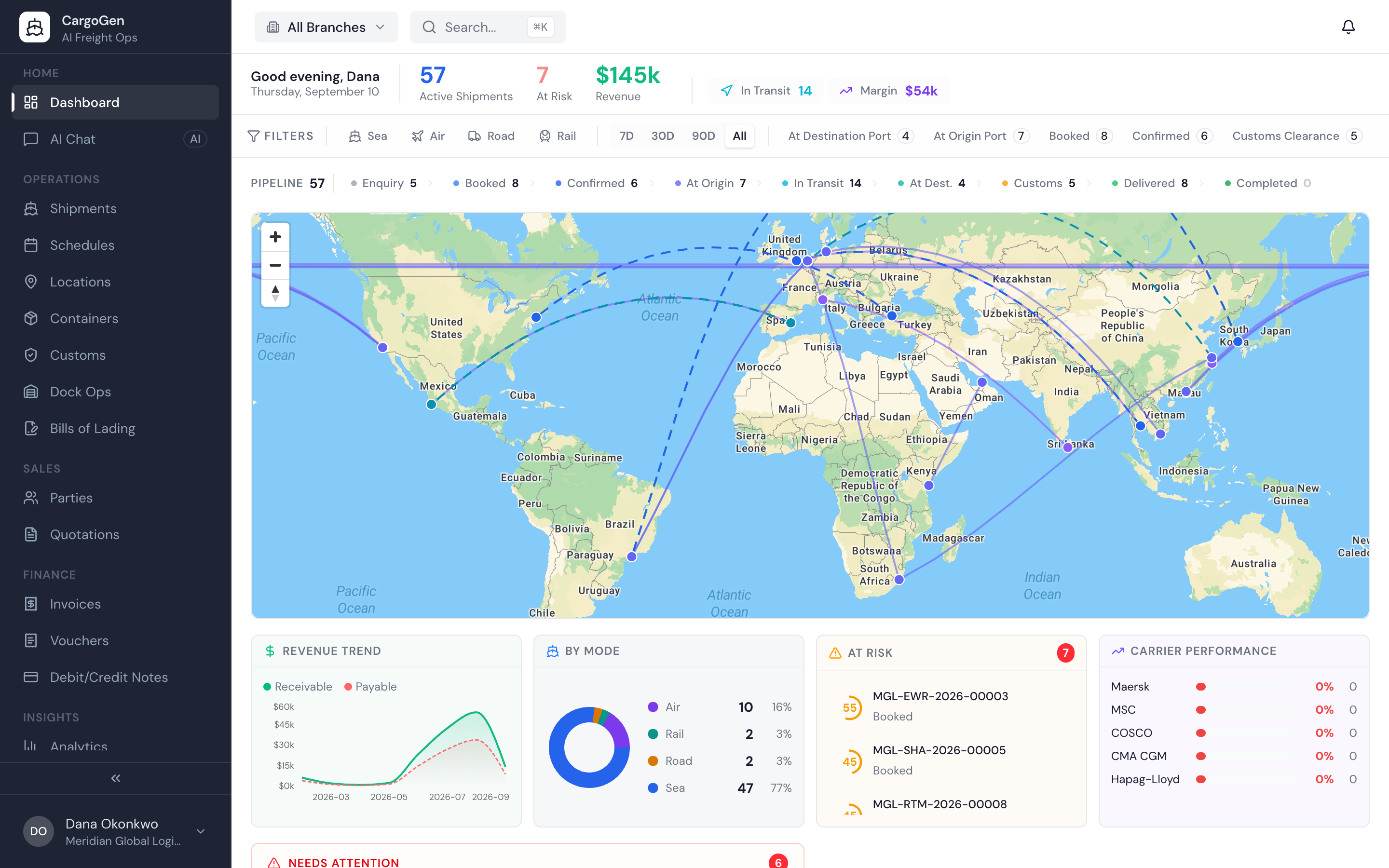
Live dataRoutes drawn on a world map, coloured by status. Hover for vessel and leg details, click through to the job. On a job's routing tab, the part already sailed is solid and the rest is dashed.
Live dataActive jobs, jobs at risk, jobs in transit, revenue and margin, for one branch or the whole company.
Jobs that need attention, ranked by score. Each links to the job, where the reasons are listed.
Ready-made reports for profit and loss, invoice ageing, profitability and carrier performance, plus a report builder where you choose what to measure and how to chart it. Export to Excel.
Pick a branch from the top bar and every number, list and report shows only that branch. Head office users can see all branches together.
A list of jobs that need attention
Each job gets an attention score from simple rules you can see. A late departure counts most. Documents not ready close to ETD adds more. Hazardous, reefer or out-of-gauge cargo adds a little, and so do long transits and missing key fields. Jobs above the threshold show up on the dashboard with their score, and the job page lists the reasons, so the team knows what to fix.
There is no hidden model guessing at delays. The rules are the same every time.
Vessel positions come from live AIS data, the signal ships broadcast at sea. Every five minutes CargoGen checks which vessels are on your active jobs and follows those. Each position report records latitude, longitude, speed, course and heading.
On the world map, routes are drawn as arcs. On a job's routing tab the arc splits at the vessel's current position: the part already sailed is solid and the rest is dashed. Port markers show origin, transhipment and destination, with ETD, ETA, ATD and ATA.
Reports follow the branch you have selected: dashboard totals, jobs by status, revenue trend, top customers and top routes. Head office users with no branch selected see the whole company.
AIS tracks ships, not containers. CargoGen does not connect to carrier systems for container events.
See it on your own shipments
Book a demo and we will add one of your jobs on a vessel that is sailing now and show it on the map.