What you can do in Shipments
One job per shipment. Air jobs ask for flight number and MAWB, sea jobs for container type and count. Update the status of many jobs at once, export to Excel, or switch between board and table views.
Upload the shipper's commercial invoice as a PDF or scan. AI reads the parties, cargo lines, values and terms and fills them in for you to check. Nothing is saved until you confirm.
AI does thisRecord VGM (weight, method and date), gate-in and gate-out times, and stuffing for each container.
Each leg has its vessel, IMO, voyage, carrier, ports, ETD and ETA. Legs link to a shared sailing, so one schedule change updates every job on that vessel.
Enter what you charge the customer and what you pay vendors: freight, handling, documentation, customs, insurance, storage, demurrage, detention. CargoGen works out the margin on each job.
A separate screen for the warehouse and dock team, split by sea and air. They record gate-in, gate-out, VGM and stuffing for each container without seeing the rest of the job.
Price an enquiry as a quotation with options and versions. When the customer accepts, turn it into a job with the details already filled in.
Track each job from enquiry to delivery
A job moves through these statuses: enquiry, booking received, confirmed, in transit, customs clearance, delivered and completed, or cancelled. Sea jobs can be FCL, LCL, Ro-Ro, breakbulk or charter; air jobs general cargo, express or charter; road jobs FTL or LTL; rail jobs containerised or loose.
A job can have several legs if the cargo is transhipped. Each leg holds the vessel, carrier, ports, ETD and ETA. Legs on the same voyage share one sailing record, so when the carrier changes the schedule you update it once and every job on that vessel follows.
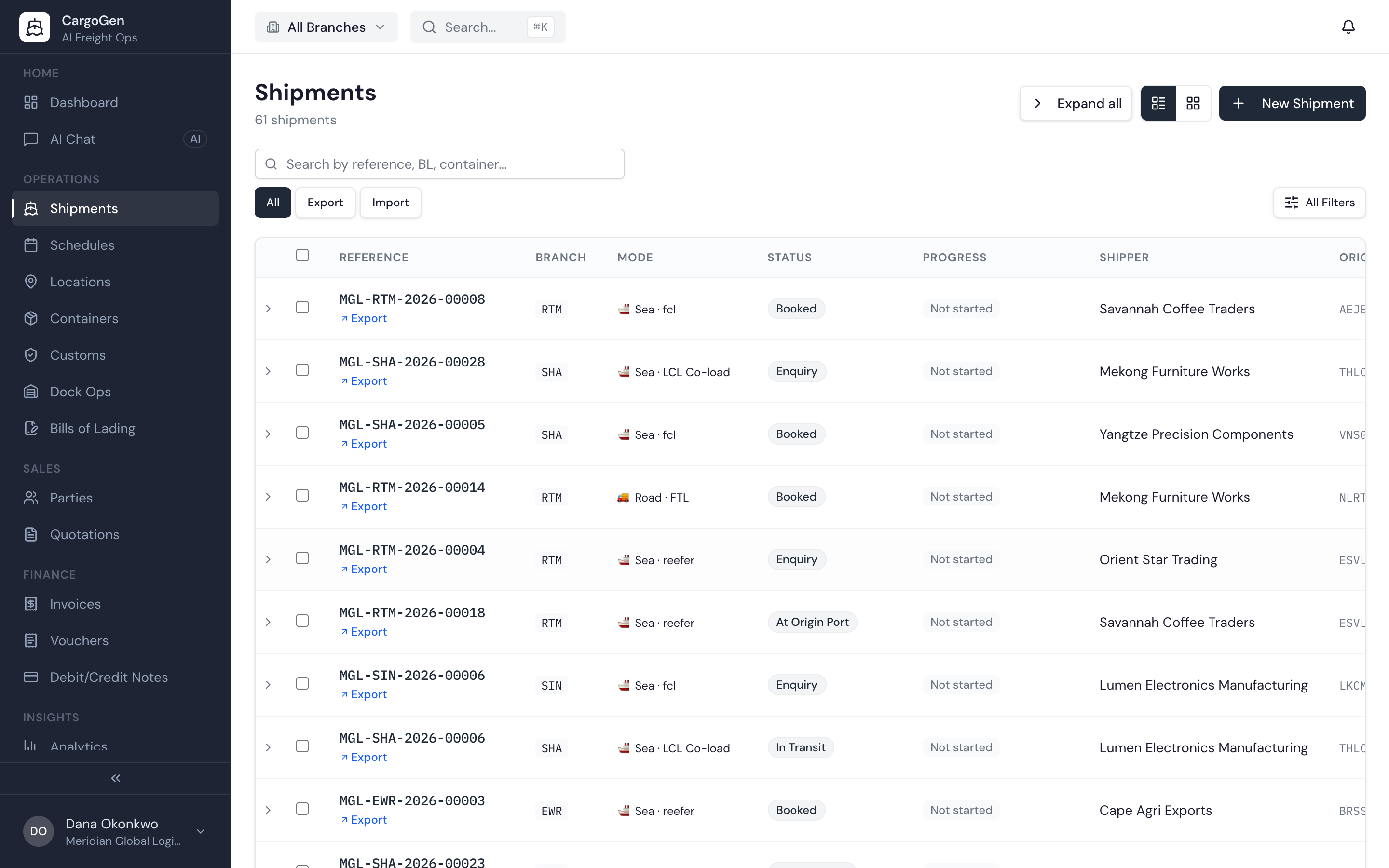
Every shipment in CargoGen is a job. A job starts as an enquiry, becomes a confirmed booking, and then moves through the remaining statuses until the cargo is delivered.
The job page has tabs for each part of the work: overview, commercial invoices, customs, milestones, routing, cargo, documents, bills of lading, financials, tasks and activity. The routing tab shows the route on a map, with the vessel's position when it is being tracked.
You don't have to type the cargo details in. Upload the commercial invoice, or forward the booking email to your CargoGen inbox, and AI fills in the parties and cargo lines. Names are matched to the clients, ports and carriers you already have, so a shipper you have worked with before is picked up, not added again. You check the details and confirm before anything is saved.
When a job is created or changes status, CargoGen can create tasks and approvals automatically. For example, you can set it up so that when a booking is confirmed, the documentation team gets a task to prepare the BL.
Many jobs start as a quotation. Quotations keep their versions and options, and the one the customer accepts turns into a job without typing the details again.